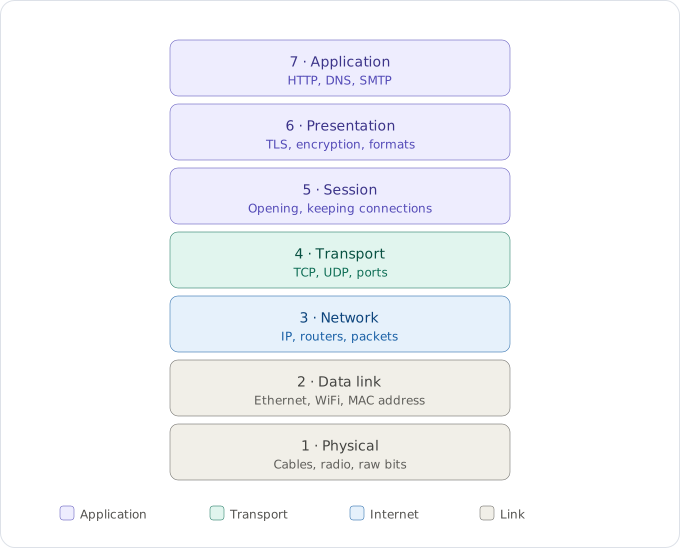
When you load a page, the request that leaves your browser doesn't travel as the tidy GET / you'd recognize. By the time it's on the wire it's a smear of radio energy wrapped around a frame wrapped around a packet wrapped around a segment wrapped around your actual HTTP. Somewhere along the way it passes through a dozen devices that each understand only part of that bundle and ignore the rest. The OSI model is the map that makes all of this legible. This post is a walk down that map, one layer at a time, following a single request from your keyboard to the server and back.
Why bother with a model at all
Before the layers, the reason for them. A layered model buys you three things, and all three are about not having to care about something.
The first is application agnosticism. Your browser shouldn't need to know whether it's speaking over WiFi, fiber, or a copper LAN. Without a standard model you'd be writing a different version of every app for every kind of wire underneath it. Layering hides the medium so the application can stay ignorant of it.
The second is equipment you can actually manage. When each layer has a defined job, you can swap a switch, upgrade a router, or replace a cable without the rest of the stack noticing. Without that boundary, every upgrade risks everything above it.
The third is decoupled innovation. TLS can get better without HTTP changing. Ethernet can get faster without IP knowing. Each layer evolves on its own schedule because it only has to honor its contract with the layers directly above and below.
That's the whole pitch: every layer is a box that does one job and hides how it does it from everyone else.
The seven layers
The stack is seven layers deep, and the easiest way in is top-down. Start where your code lives and descend toward the wire.
At the very top is Layer 7, Application, the only layer your code touches directly. This is HTTP, DNS, SMTP, FTP: the protocols that actually mean something to a program.
Layer 6, Presentation handles how data is represented on the way down: encoding, compression, and encryption. TLS lives here; this is where your plaintext becomes ciphertext.
Layer 5, Session opens, maintains, and tears down the conversation between two endpoints, keeping track of which exchange belongs to which dialogue.
These top three are where most of the model's neatness is theoretical; in practice they blur together, as we'll see in a moment.
Layer 4, Transport is the first layer with a real, gritty job you'll meet constantly. It delivers data to the right application on a machine using a port number, and it decides whether delivery is reliable (TCP) or fire-and-forget (UDP). Its unit of data is the segment.
Layer 3, Network routes data between different networks using the IP address. This is the layer routers live at, and its unit is the packet.
Layer 2, Data Link moves data across a single link (one hop) using the MAC address. Switches operate here, and its unit is the frame.
Layer 1, Physical is the bottom: raw bits as electrical, optical, or radio signals on the actual medium.
That word for "the unit of data at each layer" has a name worth keeping: the PDU, or Protocol Data Unit. The same payload is called different things as headers get bolted on going down (Data → Segment → Packet → Frame → Bits), and the name tells you which layer is handling it. A switch forwards frames; a router inspects packets. When someone says "the router dropped the packet," the word packet is already telling you which layer the drop happened at.
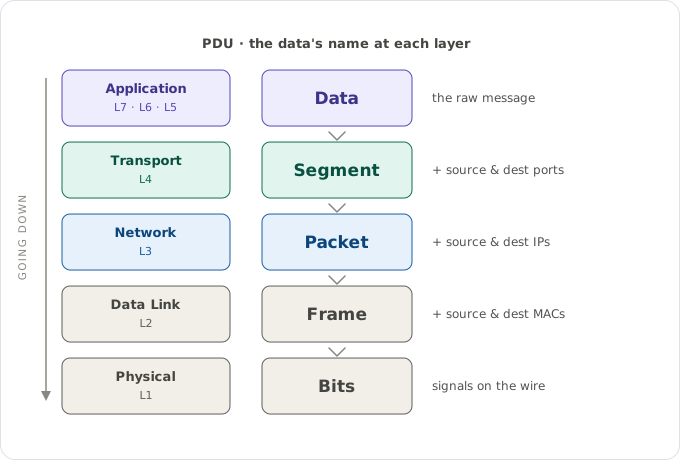
The rename chain. It's the same payload the whole way down; each layer just adds its own header and gives the result a new name, so the word tells you how far down the stack you are.
The model nobody actually builds
Here's the catch with the seven-layer model: nobody implements it as seven separate things. The real stack, the one you'll see in tcpdump or Wireshark, is the four-layer TCP/IP model. OSI is the teaching model; TCP/IP is the shipping model.
The mapping is mostly a collapse of the top. TCP/IP's Application layer swallows OSI layers 7, 6, and 5 whole: HTTP, TLS, DNS, and SMTP all live together there, which is exactly why those three OSI layers feel blurry. Transport maps cleanly to OSI Layer 4 (TCP, UDP). Internet maps to Layer 3 (IP, ICMP, ARP). And the Link layer absorbs both Layer 2 and Layer 1 (Ethernet, WiFi). Four boxes, not seven. But the seven-layer vocabulary survives because it's a more precise way to point at where something happens.
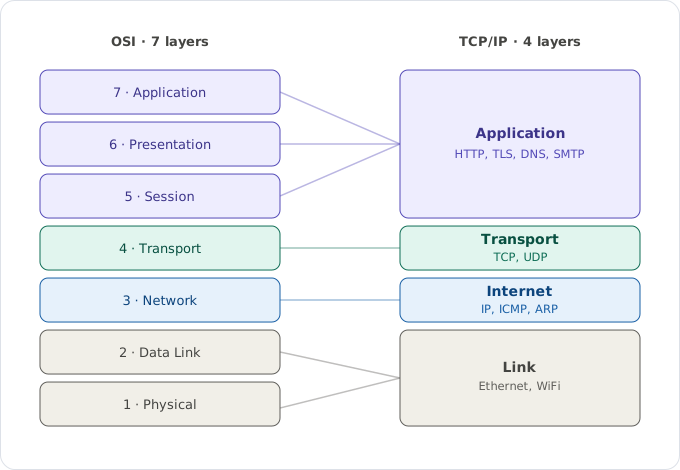
The collapse. The top three OSI layers fold into one Application layer, which is why TLS, HTTP, and DNS all feel like they live in the same place; the bottom four map almost one-to-one.
Encapsulation: envelopes inside envelopes
Now the central mechanic, the one everything else hangs off. As your data moves down the stack, each layer wraps it in its own header, like sealing a letter inside an envelope, inside a bigger envelope, inside a bigger one again. This is encapsulation.
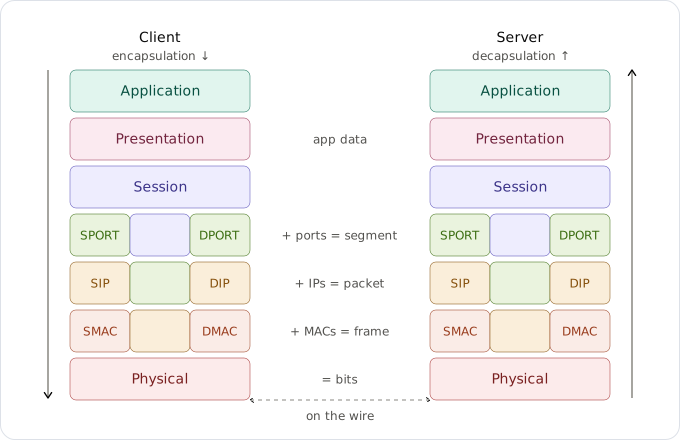
Going down on the left, coming back up on the right. Each layer adds exactly the addressing it's responsible for, and the receiving side strips them off in reverse before handing the payload up.
It starts as plain application content at the top. Then:
- Transport prepends a source and destination port (SPORT + DPORT), and now it's a segment. The ports answer which application this is for: 443 means HTTPS, so the receiving machine knows to hand it to the web server and not the mail daemon.
- Network adds a source and destination IP (SIP + DIP), and now it's a packet. The IPs answer which machine on the internet.
- Data Link adds a source and destination MAC (SMAC + DMAC), and now it's a frame. The MACs answer which device on this local link gets it next.
- Physical turns the whole nested bundle into bits on the wire.
At the receiving end the exact reverse happens: decapsulation. The bits come off the wire, and each layer going up strips off and reads its own header before handing what's left to the layer above: frame → packet → segment → data. By the time it reaches the application, every envelope is gone and only the letter remains.
The journey, hop by hop
Encapsulation explains what the bundle looks like. The journey explains why most devices only ever open part of it. A request leaving your browser passes through a surprising number of machines, and each one climbs only as far up the stack as its job requires.
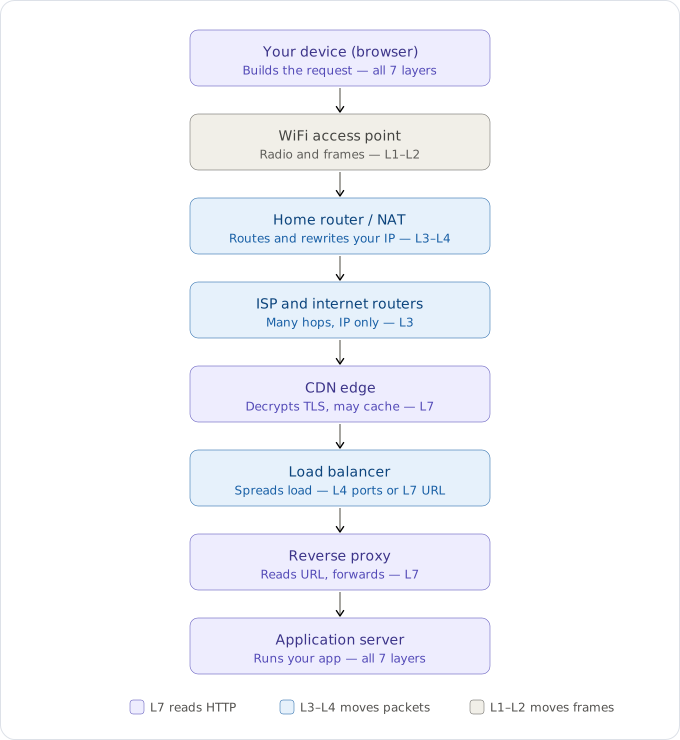
The eight stops. Notice how the deeper a box reads, the more it can decide, and how the boxes in the middle deliberately read as little as possible.
1. Your laptop, all 7 layers. The browser builds the HTTP request (L7), TLS encrypts it, TCP adds ports (L4), IP adds addresses (L3), a WiFi frame wraps it (L2), and it goes out as radio (L1). The full encapsulation from the last section happens right here.
2. The WiFi access point, L1 to L2 only. Pure radio gear. It takes your signal, turns it into a frame, and hands it onward. It never looks at your IP, never sees your HTTP. To the access point your request is just a frame to relay.
3. The home router, a combo box. That single plastic brick is secretly three or four devices: a switch (L2), a router (L3), a firewall (L3-L4), and a NAT. NAT is the big real-world thing the clean diagram hides: your laptop's private 192.168.1.5 gets rewritten to your home's one public IP, so the server never sees your real local address.
4. ISP and internet routers, L3 over and over. Your packet now hops through dozens of routers. Each climbs to L3, reads the destination IP, picks the next hop, decrements the TTL, slaps on a fresh L2 frame, and forwards. This is why the frame's MAC addresses change at every single hop while the IP stays the same the whole way.
5. The CDN edge, back up to L7. Big sites sit behind a CDN like Cloudflare. The nearest edge node often terminates your TLS (decrypts right there) and may answer straight from cache without ever bothering the origin. This is the first place that actually reads your HTTP.
6. The load balancer, and the distinction matters. An L4 load balancer only sees TCP/IP (ports and addresses) and just spreads connections around, fast and dumb. An L7 load balancer reads the actual HTTP request, so it can send /images to one pool and /api to another based on the URL.
7. The reverse proxy, an L7 box, usually nginx. Sits in front of the app, handles TLS, compression, and static files, and forwards a cleaned-up request to the real application.
8. The application server, all 7 again. The request finally climbs the whole way back up to L7, your code runs, builds a response, and then the entire thing happens in reverse, decapsulating layer by layer, all the way back to your browser.
The pattern worth carrying away: the boxes in the middle read as little as possible, because reading deeper costs time and the middle of the internet has to be fast.
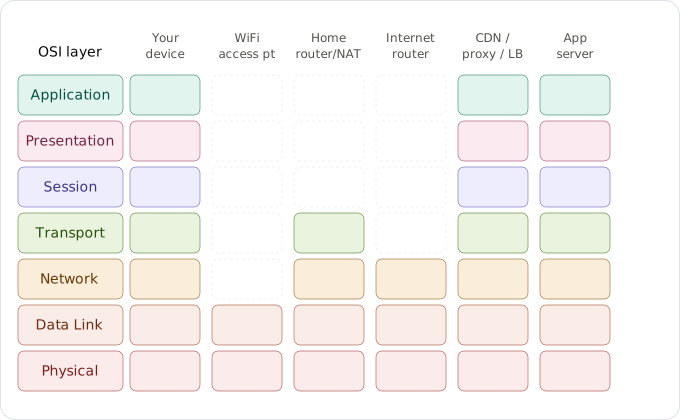
The same idea as a grid. Only the endpoints and the smart application-aware boxes light up all seven rows; the movers in between touch just the lower layers they need.
Addressing: why IP and MAC, why ports
It can look redundant to carry both an IP and a MAC address. They're doing genuinely different jobs.
The IP address is for finding the right network. IPs are organized by network and subnet, so a router can glance at one and immediately know which direction to send it (toward the right region of the internet) instead of searching everywhere. The MAC address can't do that; it only identifies a device on the local link and carries no routing structure. So IP is the end-to-end where, and MAC is the local-hop who's next.
And it isn't enough to address just the machine. One host runs many applications at once (a browser, a mail client, a database), each needing its own stream. Ports are how the operating system steers an arriving segment to the right one. The IP gets you to the machine; the port gets you to the program.
ARP: the missing link between IP and MAC
Here's a gap the addressing story leaves open. Routing decisions happen at L3 on IP, but delivering a frame to the next hop happens at L2 on MAC. So given only the next hop's IP, how does a device learn its MAC?
That's ARP, the Address Resolution Protocol. Before sending, the host broadcasts to the whole local link: "Who has 192.168.1.1? Tell me your MAC." The owner of that IP replies with its MAC, which gets cached in the ARP table for next time. This is the actual mechanism behind "MAC is local, IP is end-to-end": the destination MAC changes at every hop because it's always re-resolved for the next device, while the destination IP (the final target) never changes.
Transport: the TCP-or-UDP fork
One last thing the Transport layer hides: it isn't a single protocol but a choice between two, and the choice is a genuine trade.
TCP is reliable, ordered, and connection-oriented. It sets up a connection with a three-way handshake, guarantees delivery, retransmits anything lost, and keeps bytes in order. You pay for that with round-trips and bookkeeping. It's what HTTP(S), SSH, and email use, anywhere correctness matters more than the last millisecond.
UDP is fire-and-forget. No handshake, no guarantees, no ordering: just send and hope. In exchange you get lower latency and almost no overhead. It's what DNS, live video and voice, and online games use, where a single dropped packet matters far less than arriving on time.
That's the same decision the whole model keeps making in miniature: each layer hands you a clean contract and hides the machinery, right up until the one place, like this fork, where the trade-off is yours to make.
The whole stack, in one breath
Read it bottom to top and it all chains together. The Physical layer pushes bits; the Data Link layer wraps them in frames addressed to the next device by MAC, resolved via ARP; the Network layer routes packets across the world by IP; the Transport layer delivers them to the right application by port and decides whether to guarantee it; and the top three layers (Session, Presentation, Application) open the conversation, encrypt it, and finally make it mean something to your code. Encapsulation is how a request acquires all those envelopes on the way down, and decapsulation is how it sheds them on the way up. Every device along the path opens only the envelopes it needs and forwards the rest.
A request doesn't travel through seven layers so much as it gets dressed in them and undressed again at the other end. Once you can see the envelopes, the whole internet stops looking like magic and starts looking like the post office it actually is.