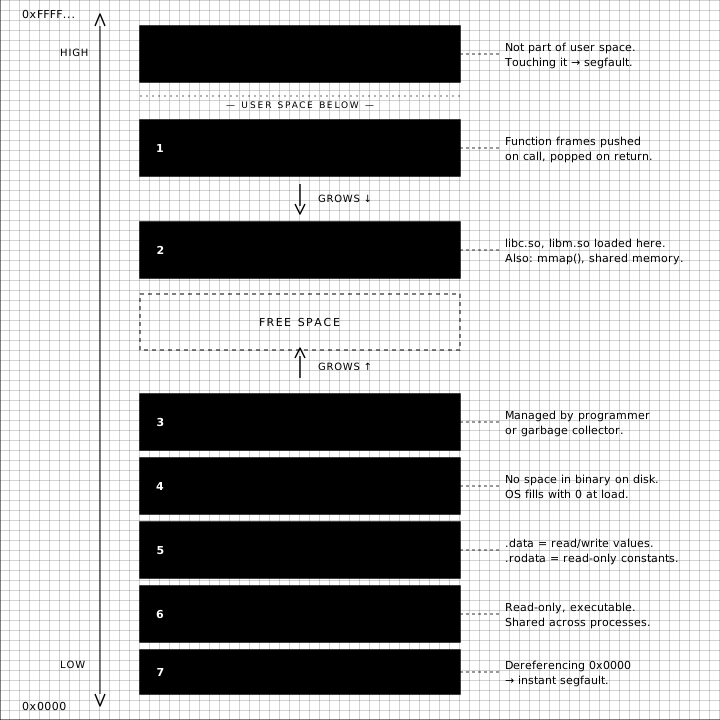
Every running program on your machine sees a private, contiguous block of memory addresses from 0x0000 all the way up to 0xFFFF.... None of that memory is real. It's a fiction the operating system maintains for the program's benefit — what computer scientists call virtual memory. The program writes to address 0x7fff_a3b4_0010 and the kernel and the MMU together translate that to whatever physical RAM page actually holds the byte right now (or whatever swap file, or memory-mapped file, or shared library, or copy-on-write page).
The fiction is the same shape for every program. The OS lays it out in a handful of regions, each with a specific job. If you've ever stared at a stack trace, or hit a segfault, or wondered why malloc is slow, you've already met some of these regions. This post is a walking tour of the rest of them, top to bottom.
The map
Memory addresses run from low at the bottom (0x0000) to high at the top (0xFFFF...). It's a convention. You'll see it the other way around in some books. Mentally, picture a tall building: the kernel lives on the top floor, your code in the lobby, and a few clever people occupy the floors in between.
There are eight regions to know about:
- Kernel space — top floor, locked door
- Stack — function calls, growing downward
- Memory-mapped region — shared libraries, mmap'd files
- Heap — the dynamic allocator's playground, growing upward
- BSS — uninitialized globals
- Data — initialized globals
- Text — your actual machine code
- The null page — the basement, deliberately unmapped
Let's walk through them.
Kernel space
The top of the address space is reserved for the operating system. On a 64-bit Linux machine, anything above 0x0000_7fff_ffff_ffff (roughly the 128 TiB mark) belongs to the kernel. Your process can't read it, can't write it, can't execute it. Try and you get a segfault — actually, you get a page fault that gets translated into SIGSEGV by the kernel because the kernel doesn't trust you.
Why is it in your address space at all if you can't touch it? Because every system call needs to jump into kernel code, and having the kernel pre-mapped means that transition is just a privileged jump instead of a full address-space switch. Modern CPUs (post-Meltdown) have made this more elaborate with KPTI, but the basic idea holds: the kernel is adjacent to you, sitting behind a guarded door.
The stack
Below the kernel, the stack starts. This is where function frames go: local variables, return addresses, saved registers, function arguments past the first few. Every function call pushes a new frame; every return pops one off.
The stack grows downward — toward lower addresses. That's why you can corrupt it by overflowing a buffer: writing past the end of a local array clobbers the saved return address sitting just below it. That's the whole basis of stack-smashing attacks, and the reason modern compilers insert canary values and the kernel randomizes the stack base (ASLR).
The stack has a fixed maximum size (8 MiB on most Linux systems by default — check with ulimit -s). Recursion deeper than that fits and you get a stack overflow.
The memory-mapped region
Below the stack sits a shared region used for two things:
- Dynamic libraries. When your program links against
libc.soorlibssl.so, the loader maps those shared object files into your address space here. The same physical pages oflibc.soare mapped into thousands of processes simultaneously — that's why shared libraries are shared. mmap()calls. When yoummapa file (or anonymous pages for, say, an allocator implementation), the kernel finds a free spot in this region and hands you back a pointer.
This is the part of the address space you most directly control without ever touching the syscall interface — every time you dlopen a plugin, every time malloc decides it needs a big chunk and asks the kernel via mmap instead of brk, you end up here.
The heap
Below the memory-mapped region is the heap. This is what malloc, new, and every garbage-collected language's nursery are built on top of.
The heap grows upward — opposite the stack. This is mostly historical; the convention dates to early Unix where the program break (brk) was a single pointer that grew up and the stack pointer grew down, and you ran out of memory when they met in the middle. Today, with mmap-backed allocators and 64-bit address spaces, they almost never meet, but the orientation stuck.
The heap is the messiest region. It's where allocators fight fragmentation, where garbage collectors do their work, where memory leaks accumulate. Everything you've ever debugged with Valgrind or AddressSanitizer happened down here.
BSS — the zeroed globals
Below the heap, in the static region of the program, sit two segments. The first is BSS (an old IBM acronym, "Block Started by Symbol" — don't ask, nobody remembers). It holds uninitialized global and static variables.
static int counter;          // → BSS
static char buffer[4096];    // → BSS
These take up zero bytes in the binary on disk. The compiler just notes how much space the BSS needs in the ELF header, and at load time the kernel maps a region of that size and zeroes it. That's why static int x; in C is guaranteed to be zero without you doing anything — the kernel zeroed it, not the C runtime.
Data — the initialized globals
Right next to BSS sits the data segment, which has two parts:
.data— globals with non-zero initial values. These take up real space on disk; the loader copies them in..rodata— read-only data: string literals,constarrays, virtual method tables. The OS marks these pages read-only, so writing to a string literal segfaults.
const char* greeting = "hello";  // pointer → .data, "hello" → .rodata
int errno_initial = 42;          // → .data
If you've ever wondered why *("foo") = 'X'; crashes, this is why: "foo" lives in a read-only page.
Text — the code
The text segment is your program. The actual machine instructions, sitting in memory, marked read-only and executable. When you call a function, the CPU jumps to an address that lives in this segment.
Because text pages are read-only and identical across copies of the same program, the OS can share them between processes — running two copies of bash doesn't double the memory used for bash's code. It's the same physical pages mapped twice.
This is also the segment that mprotect jokes are about. JITs and dynamic loaders need to write code into memory and then mark it executable. Modern hardware (W^X policies, Apple Silicon's strict separation) makes this harder than it used to be, for good security reasons.
The null page
At the very bottom, surrounding 0x0000, is a page that's deliberately not mapped to anything. Touching it segfaults instantly.
This is on purpose. C's null pointer convention is 0, and forgotten null checks are one of the most common bugs in any language built on C. By making the first page of memory unreadable, the OS turns "I forgot to check for null" from a silent corruption (reading a stray byte at address 0) into a loud crash (SIGSEGV at 0x0). It's a guard rail.
Why does any of this matter?
If you spend your days writing application code, most of these regions are invisible to you. The OS, the runtime, and the allocator are doing a good job of hiding them.
But every so often you hit a problem — a stack overflow, a heap-corruption bug, a strange EFAULT from a syscall, a process that's mysteriously using 4 GB of resident memory — and the only useful frame for thinking about it is the one above. Knowing that local variables live somewhere different from malloc'd memory, and that both live somewhere different from the string literal you just compared against, is what makes the difference between guessing and reasoning.
The fiction is well-maintained, but it has seams. It's worth knowing where they are.